
Reverse Engineer Anything: REA and AI Agents Guide
How to use REA (Reverse Engineer Anything) with AI agents: setup, Ghidra native analysis, firmware extraction with Binwalk, and logic signal decoding.
Last reviewed: October 2026 | Verified against official REA documentation & v6.7.0 release.
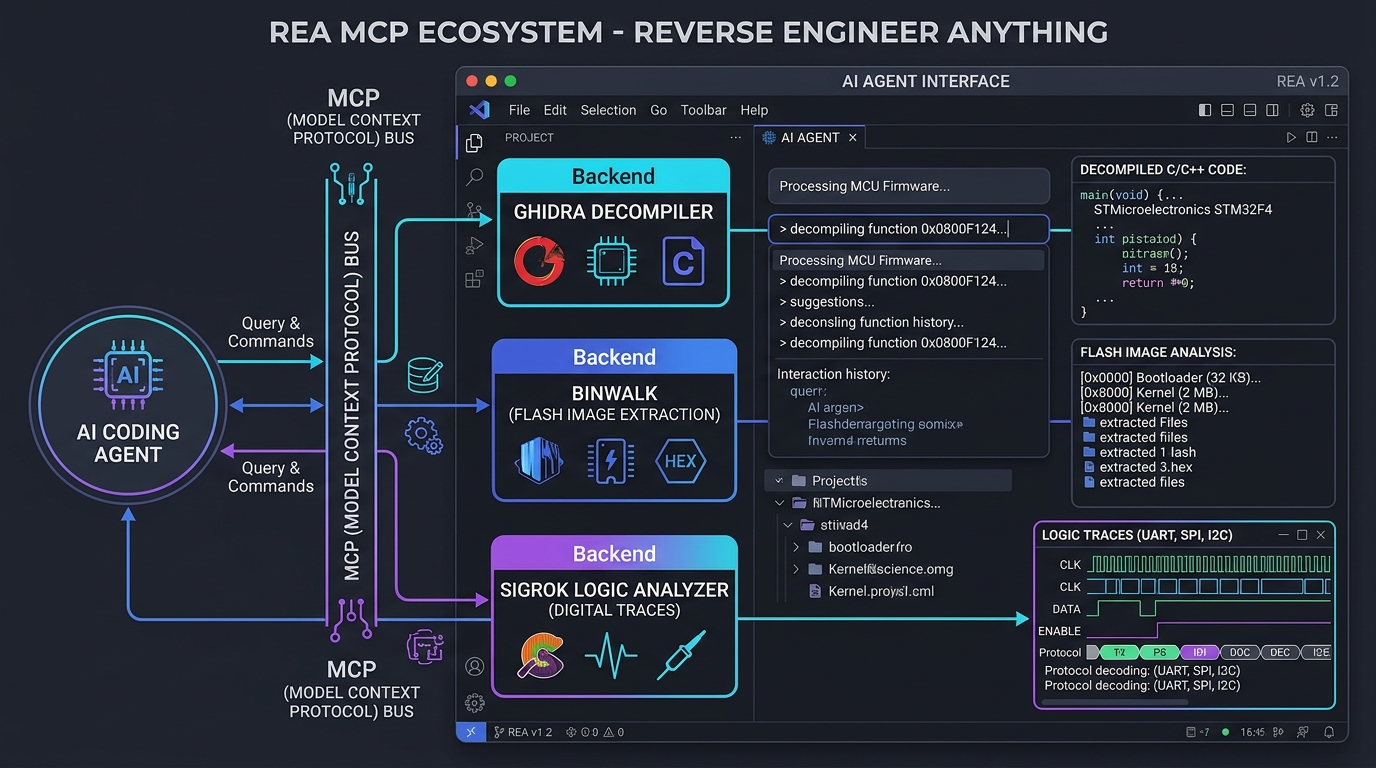
When reverse engineering modern embedded systems and IoT devices, an engineer rarely deals with just one artifact. A typical investigation starts with an SPI flash memory dump, transitions into carved bootloader and application binaries, requires tracing memory-mapped peripheral registers, and often ends with verifying UART or SPI digital waveforms captured by a logic analyzer.
Traditionally, this meant constantly switching between disjointed CLI and GUI utilities: Ghidra for decompilation, Binwalk for image unpacking, PulseView for signal inspection, and Wireshark for network packets.
REA (Reverse Engineer Anything)—developed by the open-source community at morluto/rea (rea.tools)—changes this paradigm. By exposing a unified Model Context Protocol (MCP) server through the rea-agents package, REA empowers AI agents (such as Antigravity, Claude Code, Cursor, and Gemini CLI) to coordinate native decompilers, firmware carvers, logic decoders, and runtime observers directly from your IDE.
This technical guide walks through installing REA, configuring its MCP server, connecting native engines (Ghidra, Hopper, IDA), analyzing firmware images with Binwalk, decoding logic signals with Sigrok, and running evidence-backed investigations.
Table of Contents
- What is REA (Reverse Engineer Anything)?
- How REA Works with AI Agents via MCP
- Prerequisites and Quick Setup
- Embedded & Hardware Investigation Capabilities
- Agent Prompts for Hardware Reverse Engineering
- Responsible Use and Security Boundaries
- Frequently Asked Questions
- Related Tools and Guides
What is REA (Reverse Engineer Anything)?
REA is an open-source reverse engineering framework that unifies static inspection, native decompilation, and dynamic runtime capture under a single CLI and MCP surface.
Rather than replacing battle-tested reverse engineering tools, REA connects your AI agent directly to them:
| Investigation Layer | Underlying Tool / Provider | What REA Returns to the AI Agent |
|---|---|---|
| Native Binaries | Ghidra, Hopper, IDA Pro, Rizin | C-like pseudocode, assembly, symbols, cross-references, call graphs |
| Firmware Blobs | Binwalk, Unblob | Flash partitions, file systems (SquashFS/JFFS2), kernel offsets |
| Digital Logic | sigrok-cli (v0.7.2+) | Protocol annotations (UART, SPI, I2C, CAN), timing intervals, state transitions |
| Network & Packets | tshark, capinfos | Protocol distribution, DNS/TLS queries, payload bytes, endpoints |
| Application Runtimes | Node.js, JADX, Apktool, .NET | Extracted JavaScript/Electron source maps, Android manifests, CIL code |
Every finding returned by REA includes the exact evidence and limitations behind its conclusions, ensuring the AI agent does not hallucinate facts that are unsupported by the underlying disassembler or dump.
How REA Works with AI Agents via MCP
Under the Model Context Protocol (MCP), your AI agent acts as the reasoning engine while REA acts as the multi-tool execution server.
- Query: You ask your agent a high-level engineering question (for example: "Identify the baud rate and message frame structure from this UART logic capture" or "Decompile the main control loop at flash address 0x08001000").
- Tool Execution: The agent issues structured MCP calls to REA (
analyze-firmware,inspect-binary,decode-signals). - Local Processing: REA executes the requested tools locally on your workstation, extracting exact pseudocode or decoded telemetry.
- Synthesis: The agent returns a human-readable explanation backed by line numbers, hex offsets, and register maps.
Prerequisites and Quick Setup
System Prerequisites
- Node.js: Version 22.x (>=22.19), 24.x (>=24.11), or 26+.
- Package Manager:
npm(installed automatically with Node.js). - Decompiler (Optional but recommended for native code): An existing install of Ghidra (with a matching JDK), Hopper, or IDA Pro.
- Linux Tools (Optional for firmware & signal extraction):
binwalk,sigrok-cli, andtsharkon your systemPATH.
Option 1: Automated Agent Setup
The fastest way to register REA with your agent is through the official interactive setup script:
npx rea-agents setup
The script automatically detects supported agents (Antigravity, Cursor, Claude Code, Gemini CLI), backs up existing configurations, and installs the matching workflow instructions. Restart your IDE after running setup.
Option 2: Manual MCP Registration
You can also register the REA MCP server manually by editing your project's .agents/mcp_config.json or your global user config (~/.gemini/config/mcp_config.json):
{
  "mcpServers": {
    "rea": {
      "command": "npx",
      "args": ["-y", "rea-agents@latest", "mcp"]
    }
  }
}
Tip (Schema Size): REA defaults to compact input schemas to save context window tokens. If you require complete advertised validation constraints for every tool parameter, add
"env": { "REA_MCP_INPUT_SCHEMA_PROFILE": "full" }to your MCP configuration.
Option 3: Global Terminal CLI
If you prefer running analyses directly from your shell, install rea-agents globally:
npm install --global rea-agents
rea --help
To update your REA installation to the latest release, run rea update or npx rea-agents@latest setup.
Embedded & Hardware Investigation Capabilities
1. Native Firmware Analysis with Ghidra & Hopper
When analyzing compiled bare-metal binaries (.bin or .hex), REA bridges your AI agent directly into your local decompiler:
- Automatic Architecture Detection: Disassembles 32-bit ARM Cortex-M (STM32, NRF52), Xtensa (ESP32/ESP8266), RISC-V (ESP32-C3/RP2350), and AVR microcontrollers.
- Symbol & String Recovery: Extracts constant lookup tables, baud rate divisors, error strings, and vector tables without requiring manual Ghidra GUI clicks.
- Peripheral Cross-Referencing: When SVD definitions are present, memory-mapped I/O reads such as
*(uint32_t *)0x40013804are automatically surfaced as their hardware register equivalents (USART1->DR).
For a deep dive on setting up raw binary base addresses and SVD register loaders in Ghidra, read our dedicated guide: Reverse Engineer Firmware with Ghidra and AI in Antigravity.
2. Flash Image Carving & Extraction (Binwalk & Unblob)
When you pull a raw SPI flash dump from an IoT gateway, IP camera, or smart home sensor, the image is rarely a single monolithic program. It typically contains a bootloader (U-Boot), an environment block, a Linux kernel (uImage/zImage), and a compressed file system.
Using REA's firmware analysis command:
npx -y rea-agents@latest analyze-firmware /path/to/flash_dump.bin --json
REA runs Binwalk and Unblob to identify:
- Flash layout boundaries and partition table offsets.
- Compressed file systems (SquashFS, CramFS, JFFS2, UBIFS) and extracts their root directories.
- Cryptographic keys, hardcoded credentials, and default configuration scripts (
/etc/shadow,/etc/init.d/rcS).
3. Digital Logic & Waveform Decoding (Sigrok)
When debugging custom protocols or reverse engineering proprietary sensor interfaces, engineers capture digital logic traces using affordable USB logic analyzers (Saleae, 24MHz 8-channel clones, or Raspberry Pi Pico running logic firmware).
REA interfaces directly with sigrok-cli to decode traces:
- UART / Asynchronous Serial: Automatic baud rate estimation and framing verification. Check bit duration with our UART Baud Rate Calculator.
- SPI (Serial Peripheral Interface): Decodes MOSI/MISO byte streams and chip-select timings.
- I2C / TWI: Surfaces device 7-bit addresses, ACK/NACK responses, and sub-register payloads.
4. Packet Captures & Serial Telemetry (TShark)
For connected IoT devices communicating over MQTT, CoAP, BLE, or raw TCP/UDP sockets, REA utilizes tshark and capinfos to:
- Identify active endpoints and remote cloud servers.
- Inspect binary payload checksums and verify polynomial algorithms with our CRC Calculator.
- Extract TLS Server Name Indication (SNI) headers and unencrypted telemetry.
Agent Prompts for Hardware Reverse Engineering
Copy and customize these prompts inside your AI agent panel:
Prompt 1: Flash Layout & Firmware Extraction
You have access to REA tools. I have provided a raw SPI flash dump of an IoT gateway at [FILE_PATH].

1. Analyze the firmware structure and list all detected partitions with their start offsets, lengths, and file system types.
2. If a compressed root file system is present, extract it and list the 20 most critical configuration and network startup scripts.
3. Check for any hardcoded default passwords, certificates, or cloud broker URLs.
4. Report your findings with exact hex offsets and state the confidence level for each finding.
Prompt 2: Peripheral Register & Hardware Mapping
Examine the bare-metal microcontroller binary at [FILE_PATH] with base address [0x08000000] (STM32 Cortex-M).

1. Identify all memory-mapped I/O reads and writes in the range 0x40000000 to 0x5FFFFFFF.
2. Group register accesses by hardware peripheral (RCC, GPIOA, GPIOB, USART1, TIM2).
3. Determine the configured UART baud rate from the USART BRR register divisor.
4. Identify any interrupt handlers declared in the vector table at 0x08000000.
Prompt 3: Logic Analyzer Protocol Decoding
Analyze the recorded logic trace at [FILE_PATH.sr] using REA's sigrok integration.

1. Probe the signal lines and identify which pins correspond to CLK, MOSI, MISO, and CS.
2. Decode the SPI byte stream and extract the payload transferred during the first 10 transactions.
3. Determine if the payload contains a cyclic redundancy check or checksum byte.
Responsible Use and Security Boundaries
Reverse engineering is essential for interoperability, device maintenance, security auditing, and preserving legacy systems. However, it must always be conducted within legal and ethical boundaries:
- Lawful Authorization: Only analyze hardware, binaries, and firmware that you own, have built yourself, or have explicit written permission from the copyright owner to audit.
- No Circumvention: REA and A IOT Bot do not provide tools or instructions for defeating DRM, cracking software licenses, bypassing microcontroller read-out protection (ROP), or breaking encryption.
- Data Privacy: REA executes tools locally on your workstation. However, decompiled pseudocode and strings returned to your agent are processed by your IDE's configured language model. Never paste proprietary or classified firmware into cloud models without corporate approval.
Frequently Asked Questions
What is the difference between REA and standalone Ghidra?
Ghidra is a specialized software reverse engineering suite focused on disassembly and decompilation. REA is an orchestration layer and MCP server that connects AI coding agents to Ghidra, Hopper, IDA, Binwalk, Sigrok, and TShark simultaneously, allowing one agent to analyze flash dumps, decompiled functions, and bus waveforms seamlessly.
Can REA run without installing Hopper or IDA?
Yes. REA works out of the box with your existing Ghidra installation, or for static analysis (JavaScript, .NET, firmware carving) without any native decompiler installed at all.
Does REA support Windows?
Yes. REA supports Windows, macOS, and Linux. On Windows, Node.js and Ghidra run natively. Firmware utilities requiring Linux tools (such as Binwalk or Sigrok) can be accessed via WSL (Windows Subsystem for Linux).
How do I update REA to the latest release?
If installed globally via npm, run rea update. If you use npx, running npx rea-agents@latest setup updates your agent integrations and MCP schemas to the newest version.
Related Tools and Guides
- Reverse Engineer Firmware with Ghidra and AI in Antigravity: Detailed step-by-step guide on Ghidra base addresses, vector tables, and SVD register mapping.
- UART Baud Rate Calculator: Calculate bit times, framing overhead, and throughput from recovered baud rate divisors.
- CRC Calculator: Validate standard CRC-8, CRC-16, and CRC-32 checksums found in disassembled protocol frames.
- Bitwise Calculator: Decode bit masks, bitwise shifts, and peripheral configuration registers.
- Number Base Converter: Convert hex memory addresses, binary masks, and decimal offsets.
- ESP32 Chip Selector: Explore Xtensa vs. RISC-V architectures across the ESP32 family.