
Best Microcontroller for AI: Top 5 MCUs Compared (2026)
Compare the top 5 microcontrollers for edge AI and TinyML in 2026. See verified specs, NPU performance, memory, power draw, and real-world use cases.
Last reviewed: October 2026 | Verified against official manufacturer datasheets.
Let's be honest for a second. A few years ago, picking a microcontroller was simple: Arduino for learning, STM32 for "serious" work, ESP32 when you needed Wi-Fi. Done.
Then AI showed up and everything got messy. Suddenly every chip has an "NPU", every vendor says "edge AI", and people online are talking about superintelligence like it will run on a coin cell battery. It won't. Let's clear that up first.
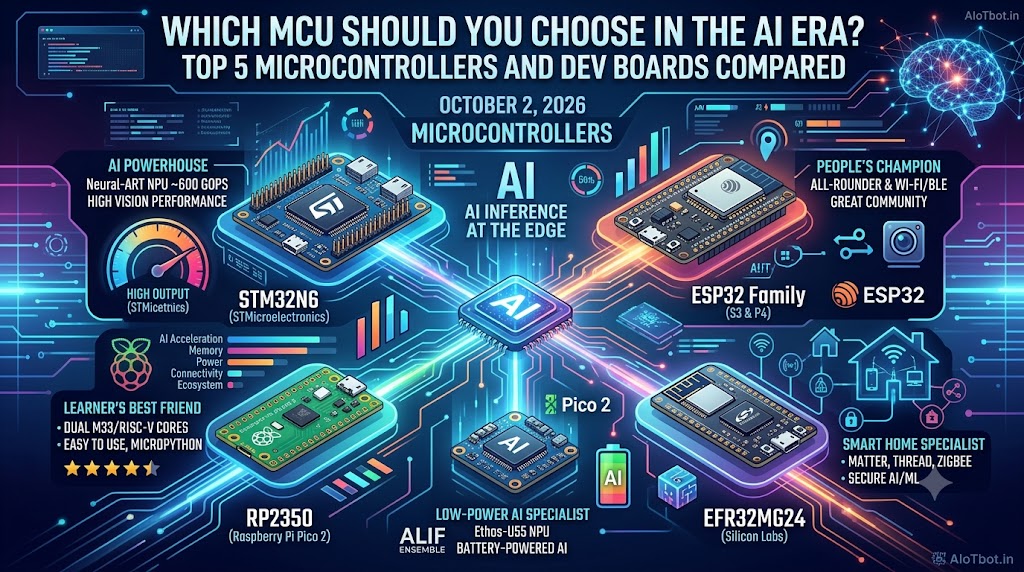
The Five MCUs in One Line Each
- STMicroelectronics STM32N6: The AI powerhouse pairing an 800 MHz Cortex-M55 with a dedicated ~600 GOPS Neural-ART NPU for real-time camera vision.
- Espressif ESP32-S3 & ESP32-P4: The developer champions combining wireless connectivity, vector neural acceleration, and low-cost camera modules.
- Raspberry Pi RP2350 (Pico 2): The accessible dual-core Cortex-M33 / Hazard3 RISC-V platform for education, prototyping, and sensor-level TinyML.
- Alif Ensemble E3: The ultra-low-power specialist running dual Cortex-M55 and Ethos-U55 microNPU on microwatts for battery-operated devices.
- Silicon Labs EFR32MG24: The dedicated smart-home SoC with hardware ML acceleration and native Matter, Thread, and BLE radio integration.
Table of Contents
- The Reality Check: Where Does AI Actually Live?
- What to Look at Before You Buy
- The Top 5 Microcontrollers for the AI Era
- Head-to-Head Comparison Table
- Selection Guide: Which MCU Should You Pick?
- On-Device Inference Code Example
- Frequently Asked Questions
- Related Guides and Tools
The Reality Check: Where Does AI Actually Live?
The huge foundation models live in high-density data centers drawing hundreds of kilowatts. Your microcontroller will never run a 70-billion-parameter LLM. What your microcontroller can do is the part that makes physical products feel intelligent: hear an acoustic wake word, spot a person in a camera frame, detect industrial motor bearing vibration anomalies before catastrophic failure, or recognise hand gestures. All of it locally, privately, and in milliseconds without cloud latency.
The smart architectural split is this: the cloud is the heavy analytical brain, and the MCU is the eyes, ears, and immediate reflexes. Your engineering job is to choose the right reflexes for your project's power budget, physical form factor, and compute workload.
If you are deciding between full Linux systems and microcontrollers, see our deep-dive guide: MCU vs MPU for AI: Which One Do You Need?.
What to look at before you buy
Skip vendor marketing brochures and evaluate these five objective criteria:
- AI hardware acceleration: Does the chip feature a dedicated Neural Processing Unit (NPU) or SIMD/DSP vector instructions, or does it execute matrix multiplications on a standard CPU pipeline?
- Memory (SRAM and Flash): Neural network models are hungry. Activation buffers (tensor arena) reside in SRAM, while model weights reside in flash. Estimate your requirements early with our TinyML Memory Estimator.
- Power budget: A coin-cell acoustic sensor requires microwatts in sleep mode; an 800 MHz machine-vision processor draws hundreds of milliwatts. Calculate your battery operational lifetime with our Battery Life Calculator.
- Connectivity: Does your architecture demand Wi-Fi 6, Bluetooth Low Energy (BLE), 802.15.4 (Thread/Matter), or an offline air-gapped bus?
- Toolchain & software ecosystem: Clean support in TensorFlow Lite for Microcontrollers (TFLM), Edge Impulse, or vendor SDKs saves months of engineering time.
The Top 5 Microcontrollers for the AI Era
1. STMicroelectronics STM32N6: The AI Powerhouse
If you need the highest edge AI compute performance available in an MCU, the STM32N6 series represents the benchmark. STMicroelectronics built the STM32N6 around an Arm Cortex-M55 core clocked at up to 800 MHz, accompanied by ST's proprietary Neural-ART hardware accelerator rated at approximately 600 GOPS (Giga Operations Per Second).
Unlike earlier MCUs that struggled with video frames, the STM32N6 integrates an ISP (Image Signal Processor), hardware JPEG encoder/decoder, and MIPI CSI-2 camera input. With 4.2 MB of contiguous on-chip SRAM, you can hold intermediate tensor activations in fast memory without external DRAM latency bottlenecks.
- Best for: High-speed computer vision, real-time object classification, industrial PCB optical defect inspection, and multi-sensor sensor fusion.
- Trade-offs: Significant power consumption under full 800 MHz compute load (hundreds of milliwatts). Requires robust thermal layout and multi-layer PCB routing for high-density BGA packages.
- Hardware options: STM32N6570-DK Discovery kit, Nucleo-N6 boards, and OpenMV Cam N6.
2. Espressif ESP32 Family (S3 and P4): The People's Champion
Espressif offers two distinct solutions for machine learning workloads:
- ESP32-S3: Dual-core Xtensa LX7 up to 240 MHz featuring custom vector instructions (SIMD) tailored for accelerating 8-bit and 16-bit integer matrix math. It includes integrated 2.4 GHz Wi-Fi 4 and Bluetooth 5 (LE), 512 KB SRAM, and up to 16 MB external octal PSRAM. Camera boards like the XIAO ESP32S3 Sense and ESP32-S3-EYE make it an industry favorite.
- ESP32-P4: Dual-core 32-bit RISC-V cores clocked at 400 MHz with single-precision FPU and vector instruction support. It features an onboard H.264 video encoder, MIPI CSI camera interface, MIPI DSI display output, and 768 KB on-chip SRAM. It deliberately omits onboard RF to preserve silicon real estate for high-bandwidth multimedia (pair with ESP32-C6 for Wi-Fi 6/Thread).
To compare ESP32 variants side-by-side, explore our ESP32 Chip Selector and review wiring layouts with the ESP32 GPIO Reference.
- Best for: Low-cost AI vision, voice command recognition, smart home appliances, and interactive touch HMIs.
- Trade-offs: Higher baseline active radio current than specialized ultra-low-power BLE microcontrollers.
3. Raspberry Pi RP2350: The Learner's Best Friend
The Raspberry Pi RP2350 (powering the Raspberry Pi Pico 2 and Pico 2 W) introduces a novel dual-core architecture: developers can boot dual Arm Cortex-M33 cores or dual open-source Hazard3 RISC-V cores running at 150 MHz. It provides 520 KB of SRAM across 10 independent banks and Raspberry Pi's unique Programmable I/O (PIO) state machines.
The RP2350 does not feature a dedicated hardware NPU; inference runs on the Cortex-M33 CPU cores utilizing CMSIS-NN DSP acceleration. It excels at low-frequency signal processing and TinyML classification.
Read our overview on open silicon: Best RISC-V Boards for Embedded Projects and RISC-V in Embedded Systems.
- Best for: Students, makers, educational labs, vibration analysis, and audio keyword spotting.
- Trade-offs: Limited throughput for high-resolution camera image classification.
4. Alif Ensemble E3: The Low-Power AI Specialist
Alif Semiconductor's Ensemble family is engineered specifically for energy-harvesting and battery-powered edge inference. The Ensemble E3 integrates dual Arm Cortex-M55 cores with an Arm Ethos-U55 microNPU (up to 256 MACs/cycle).
The key architectural innovation is autonomous power domains: a low-power 20 MHz Cortex-M55 core can monitor background environmental sensors, waking the 400 MHz high-performance M55 core and Ethos-U55 NPU only when a threshold event occurs. The OpenMV Cam AE3 module can execute YOLO-class object detection on small image frames while consuming approximately 250 mW under active inference.
- Best for: Wearables, battery-powered camera traps, remote wildlife monitoring, and multi-year condition monitoring.
- Trade-offs: Commercial ecosystem is newer than Espressif or ST; developer documentation requires steeper onboarding.
5. Silicon Labs EFR32MG24: The Smart Home Specialist
When an edge AI device must operate within the modern smart home ecosystem (Matter, Thread, Zigbee 3.0, BLE 5.3), the Silicon Labs EFR32MG24 is purpose-built. It combines a 78 MHz Arm Cortex-M33 core with a dedicated hardware Matrix-Vector AI/ML accelerator.
The integrated ML accelerator offloads convolution, pooling, and activation functions from the CPU core, reducing inference execution latency by up to 4x and energy consumption by up to 6x compared to software emulation.
- Best for: Matter-certified smart home sensors, glass-break detectors, acoustic anomaly detection, and occupancy monitors.
- Trade-offs: Designed for 1D sensor and audio data; not architected for continuous video streams.
Head-to-Head Comparison Table
All specifications verified against official manufacturer datasheets as of October 2026.
| Microcontroller | Architecture & Frequency | AI Hardware Acceleration | On-Chip RAM / Flash | Connectivity | Typical Power | Verified Source |
|---|---|---|---|---|---|---|
| ST STM32N657 | Cortex-M55 @ up to 800 MHz | Neural-ART NPU (~600 GOPS) + ISP | 4.2 MB SRAM / Ext Flash | Depends on PHY / board | 250 – 800 mW | STMicroelectronics Datasheet (Oct 2026) |
| Espressif ESP32-S3 | Dual Xtensa LX7 @ 240 MHz | Custom Vector Instructions (SIMD) | 512 KB SRAM + Ext PSRAM | Wi-Fi 4 (2.4 GHz) + BLE 5.0 | 100 – 260 mW | Espressif S3 Datasheet (Oct 2026) |
| Espressif ESP32-P4 | Dual RISC-V @ 400 MHz | FPU & Vector Extensions + H.264 | 768 KB SRAM + 32 MB PSRAM | External companion (SDIO/SPI) | 150 – 350 mW | Espressif P4 Datasheet (Oct 2026) |
| Raspberry Pi RP2350 | Dual Cortex-M33 / Hazard3 @ 150 MHz | CPU-only (CMSIS-NN DSP) | 520 KB SRAM / Ext QSPI | Pico 2 W: Wi-Fi 4 + BLE 5.2 | 40 – 120 mW | Raspberry Pi Datasheet (Oct 2026) |
| Alif Ensemble E3 | Dual Cortex-M55 + Ethos-U55 NPU | Arm Ethos-U55 microNPU | Up to 13.5 MB SRAM / 5.5 MB MRAM | Varies by module | 10 – 250 mW | Alif Semiconductor (Oct 2026) |
| Silicon Labs EFR32MG24 | Cortex-M33 @ 78 MHz | Matrix-Vector ML Accelerator | 256 KB RAM / Up to 1536 KB Flash | Matter, Thread, Zigbee, BLE | 5 – 40 mW | Silicon Labs EFR32MG24 (Oct 2026) |
Selection Guide: Which MCU Should You Pick?
Here is the straightforward engineering decision rubric:
- Learning TinyML or prototyping on a tight budget: Start with the Raspberry Pi Pico 2 W or ESP32-S3. Toolchains are mature, sample code is everywhere, and development boards cost under $10.
- Camera vision or person detection on Wi-Fi: The ESP32-S3 with external PSRAM provides the best balance of software support, community libraries, and bill-of-materials cost.
- High-framerate computer vision & industrial inspection: Select the STM32N6. Its dedicated 600 GOPS Neural-ART NPU and MIPI CSI interface handle high-throughput convolutional networks that overwhelm other MCUs.
- Multi-month battery operation: Choose the Alif Ensemble E3 for vision, or the Silicon Labs EFR32MG24 for acoustic/vibration sensing.
- Smart home connected devices: The EFR32MG24 or ESP32-C6 are the standard choices for Matter over Thread integration.
Before buying hardware, check model RAM and flash requirements: Best Microcontroller for TinyML and Machine Learning.
On-Device Inference Code Example
Regardless of which silicon you select, the baseline workflow in TensorFlow Lite for Microcontrollers (TFLM) remains consistent:
#include "tensorflow/lite/micro/micro_interpreter.h"
#include "tensorflow/lite/micro/micro_mutable_op_resolver.h"
#include "model_data.h" // Quantized uint8 model converted to C array

// Sized using the TinyML Memory Estimator
constexpr int kTensorArenaSize = 64 * 1024;
static uint8_t tensor_arena[kTensorArenaSize];

void setup_inference() {
  const tflite::Model* model = tflite::GetModel(g_model_data);
  static tflite::MicroMutableOpResolver<5> resolver;
  resolver.AddConv2D();
  resolver.AddDepthwiseConv2D();
  resolver.AddFullyConnected();
  resolver.AddSoftmax();
  resolver.AddReshape();

  static tflite::MicroInterpreter interpreter(
      model, resolver, tensor_arena, kTensorArenaSize);
  interpreter.AllocateTensors();
}

void run_inference(const int8_t* sensor_samples, int sample_count) {
  TfLiteTensor* input = interpreter.input(0);
  for (int i = 0; i < sample_count; i++) {
    input->data.int8[i] = sensor_samples[i];
  }

  // Execute inference on-device
  if (interpreter.Invoke() != kTfLiteOk) {
    return; // Handle execution error
  }

  TfLiteTensor* output = interpreter.output(0);
  int8_t top_score = output->data.int8[0];
  // Trigger local actuator or alarm based on score
}
Notice that the application logic does not change between chips. What changes is whether matrix multiplications execute in software cycles or in a hardware accelerator, directly impacting your battery life and latency.
Frequently Asked Questions
What is the difference between an MCU and an MPU for AI?
A microcontroller (MCU) integrates the processor core, RAM (typically 256 KB to 4 MB), and flash on a single silicon die, running bare-metal C/C++ or an RTOS with microwatt sleep currents. A microprocessor (MPU, such as an NXP i.MX or Raspberry Pi CM4) runs Linux, requires external DDR DRAM, draws 1 to 5 Watts, and handles complex multi-stream video pipelines or large models. For a detailed comparison, see our guide on MCU vs MPU for AI.
Can a microcontroller run machine learning without an internet connection?
Yes. Microcontroller-based AI (TinyML) executes on-device inference entirely offline. Once a trained model is quantized (typically to 8-bit integers) and compiled into flash memory, the MCU processes sensor readings locally without internet access, cloud latency, or recurring API costs.
How much RAM do I need on an MCU to run TinyML models?
Simple sensor anomaly detection and keyword spotting models require between 16 KB and 64 KB of SRAM for activation buffers. Visual wake word and person detection models require 256 KB to 1 MB of SRAM. High-resolution object detection models (e.g., YOLO variants) require 2 MB to 8 MB of RAM. Use our TinyML Memory Estimator to calculate exact tensor arena dimensions.
Does a microcontroller need an NPU to run neural networks?
No. Standard Cortex-M4 or M33 CPU cores can run neural networks in software using optimized libraries like CMSIS-NN. However, a dedicated NPU or vector extension (like Arm Ethos-U55 or ESP32-S3 SIMD) performs integer matrix multiplication up to 10x to 100x faster and with significantly lower energy per inference.
Related Guides and Tools
- TinyML Memory Estimator: Calculate required SRAM and flash tensor arena sizes for edge models.
- ESP32 Chip Selector: Filter ESP32 variants by Wi-Fi 6, RISC-V, Bluetooth 5, and AI vector support.
- Battery Life Calculator: Compute run-time for battery-operated edge sensors based on active and sleep currents.
- Best Microcontroller for TinyML and Machine Learning: In-depth memory and toolchain selection guide.
- Best RISC-V Boards for Embedded Projects: Modern open-silicon development boards compared.
- MCU vs MPU for AI: Which One Do You Need?: Architecture breakdown between RTOS microcontrollers and Linux microprocessors.